
For companies · Pilot
The mileage log for companies with field staff and company cars.
Your drivers record their trips with the iPhone app as usual. In the web view you see what was driven for business and which customers were visited. Private stays private.
We're starting with our first companies. Get in touch and we'll set up Kilometra with you.
Request the pilot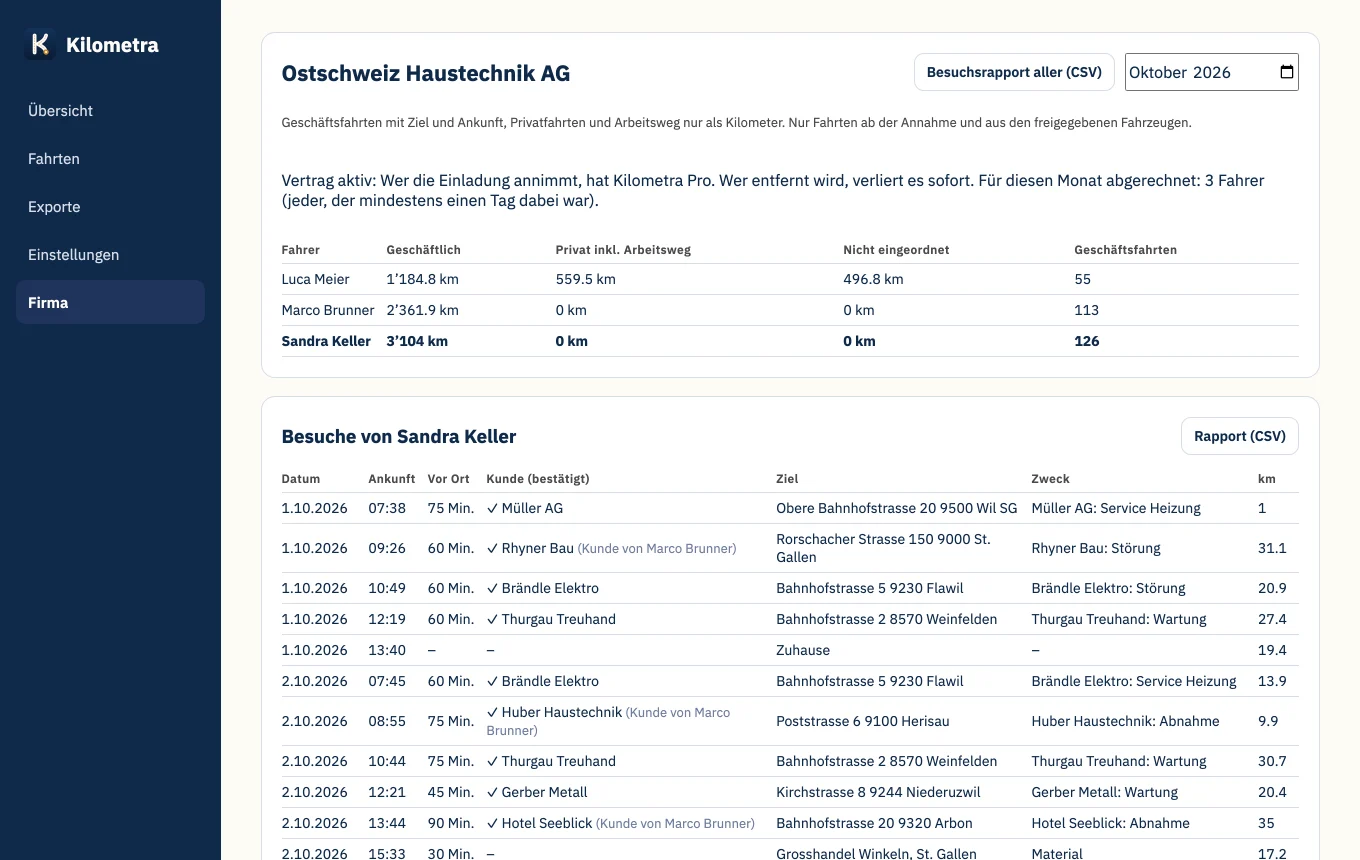
How you get started
-
Invite
You invite drivers by email, many at once if you like.
-
Accept
Before accepting, every driver sees what the company sees.
-
Drive
The company car appears in their app, trips are recorded as usual.
-
Overview
You see the overview, visits and billing in the web view.
200 m
Radius in which a visit is confirmed automatically
0
Entries per visit for field staff
1 click
for the month's visit report as CSV
EU
Data on servers in Frankfurt
Proof of visit
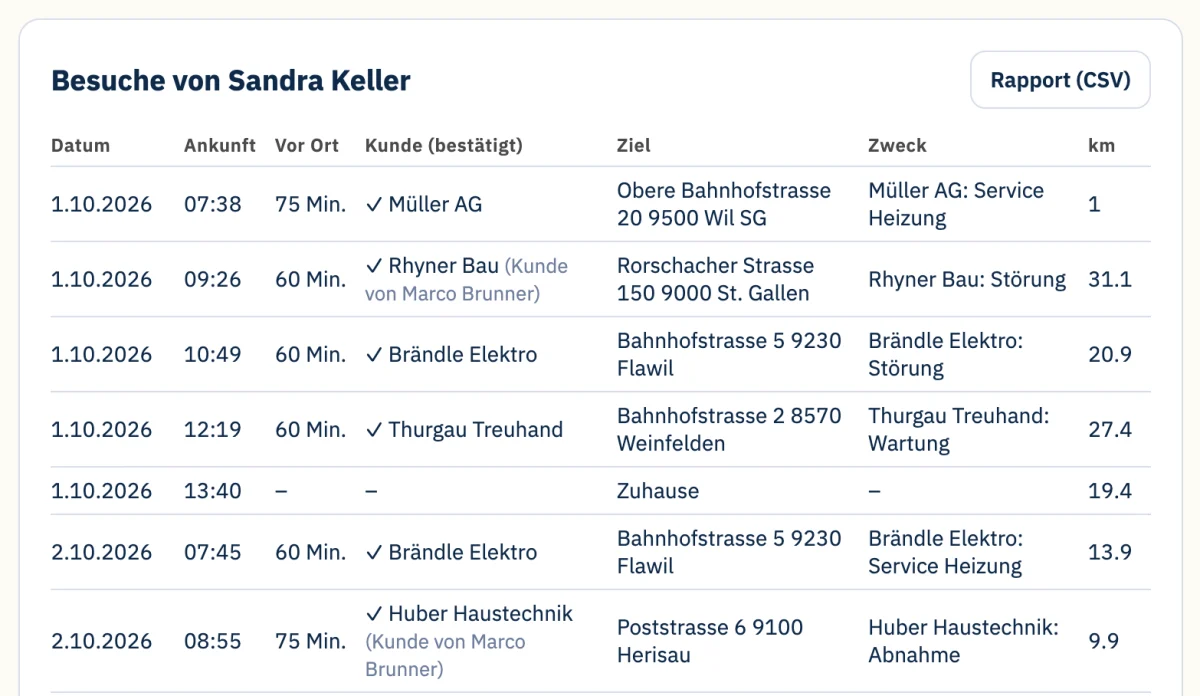
Been to the customer? It's already there.
If a business trip ends within 200 m of the customer's address, the visit is confirmed, with arrival time and time on site. Field staff enter nothing and never check in. Visits to a colleague's customers are marked.
Customer base
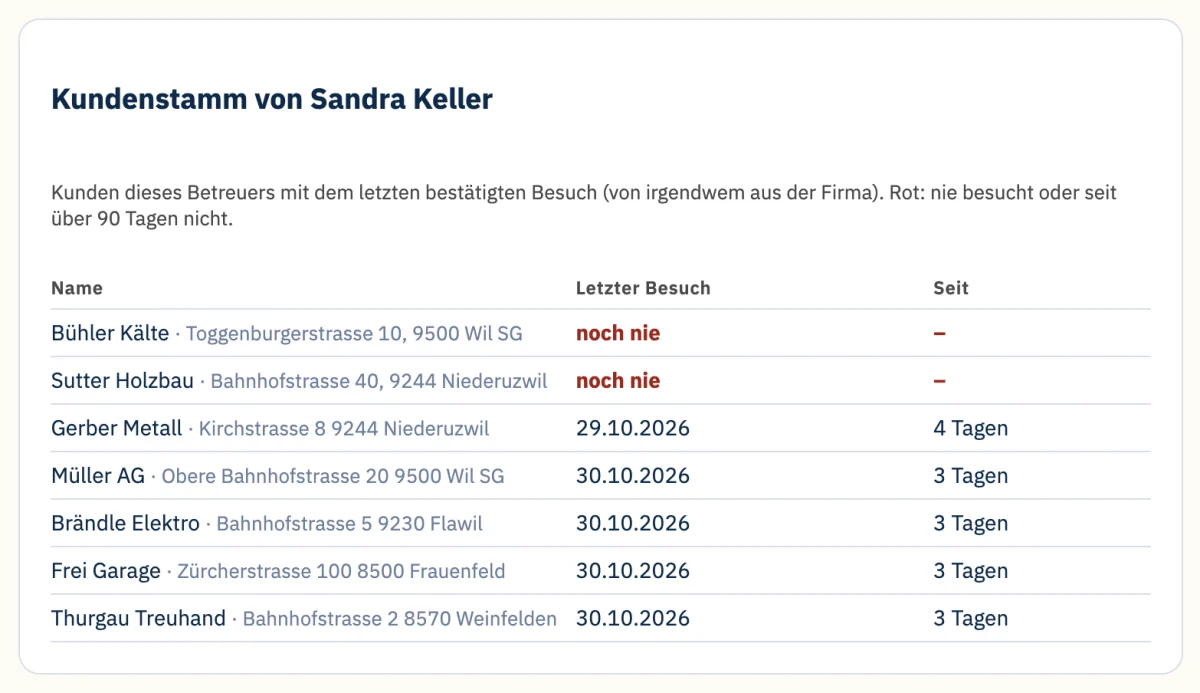
Who hasn't been visited in a while?
Every field rep has their customer base, imported straight from the CRM or Excel. Kilometra shows the last confirmed visit for each customer. Customers never visited or not for over 90 days are shown in red at the top.
Route planning
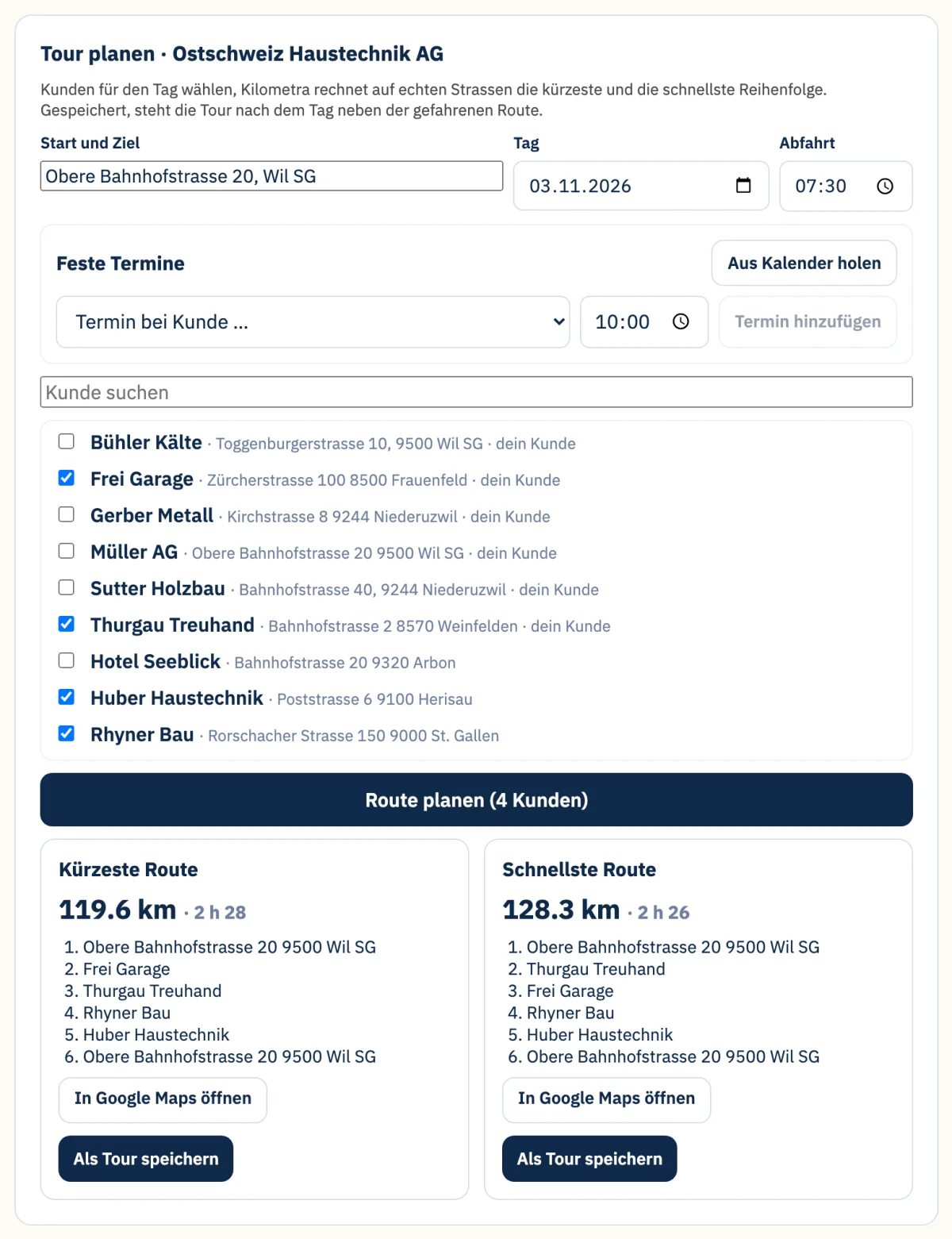
Field staff pick the customers, Kilometra plans the route.
Tick the day's customers and enter the starting point: Kilometra calculates the shortest and the fastest route on real roads and opens it with all stops in Google Maps. After the day, the route actually driven appears next to it, with kilometres and driving time. You see where trips could run better, without ranking anyone.
Appointments and suggestions
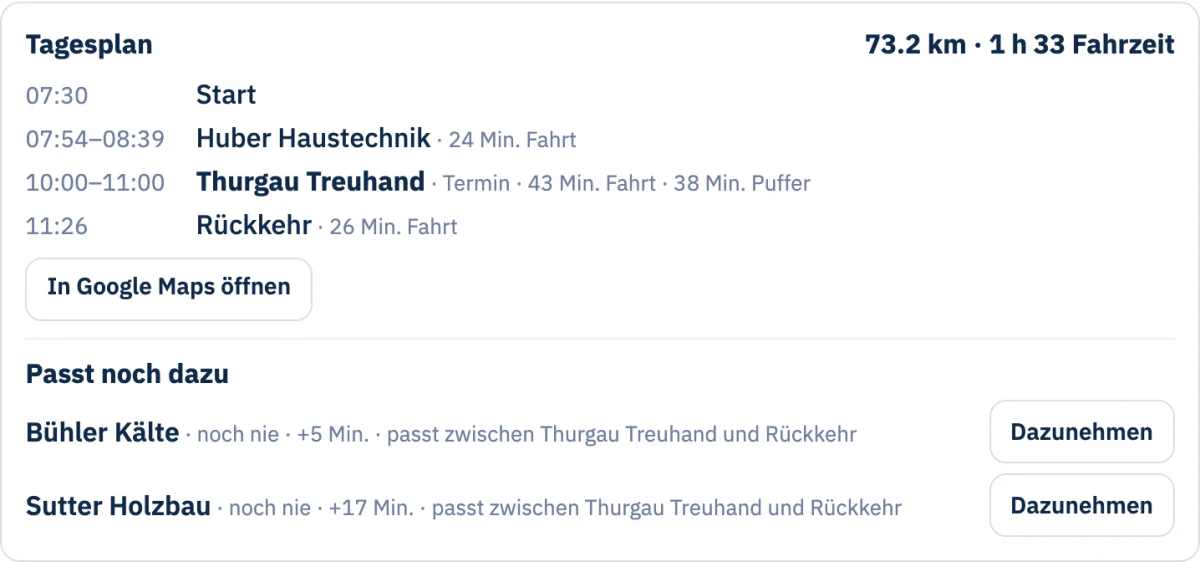
Appointments in the calendar? Kilometra fills the gaps.
Fixed appointments come from the calendar via a link (Outlook, Google or iCloud) or are entered by hand. Kilometra plans the day with arrival, driving time and buffer, and suggests customers that fit into the gaps: never or long not visited, with the detour in minutes. One click adds them.
Company cars
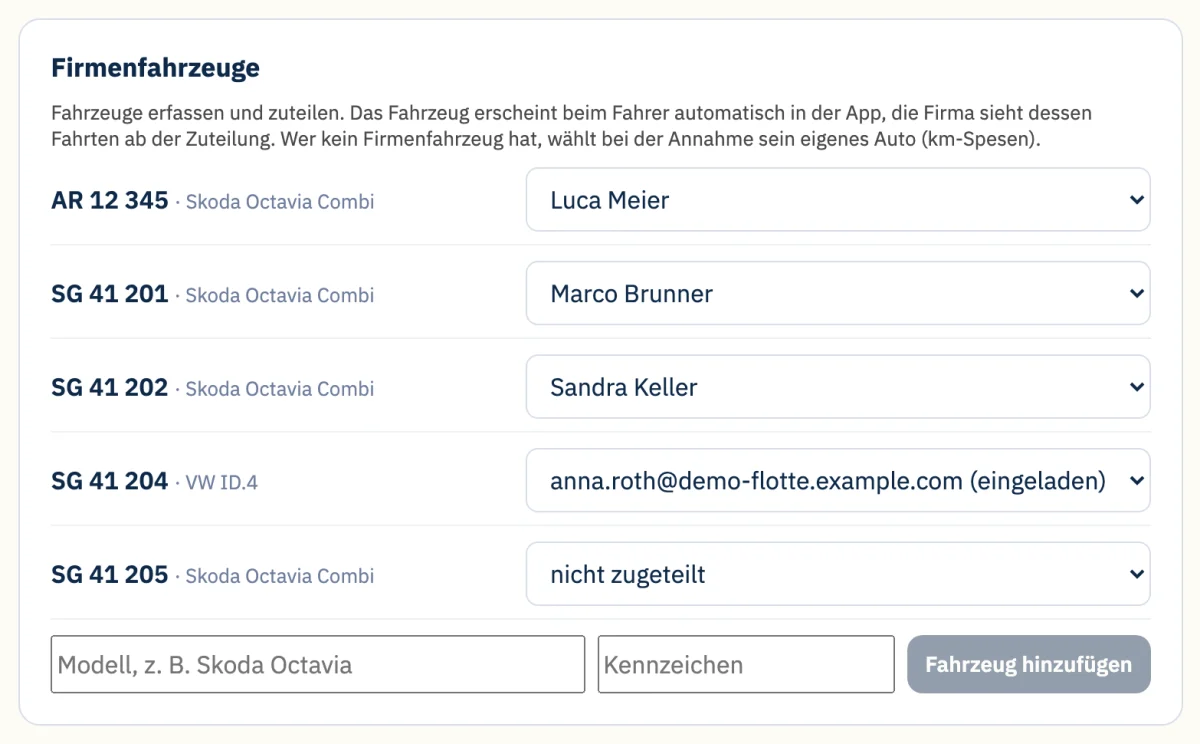
You assign the cars, the app does the rest.
Add company cars and assign them to a driver, even before they accept the invitation. The car appears automatically in their app. If the car changes driver, the company sees the trips with the new driver from then on.
Also included
Invite drivers by email
One by one or many at once, for example from an Excel list. The invitation explains what the company sees and leads straight to the app.
Own car, mileage expenses
Anyone without a company car drives their own and selects it when accepting. That way you see the business kilometres for expenses.
Monthly overview per driver
Kilometres for business, private including commuting, and not yet categorised, per driver and month.
Active drivers at a glance
On the company page you can see at any time how many drivers were active in the month. Anyone who leaves is out immediately.
Kilometra Pro through the company
Your drivers get Kilometra Pro in the app and web view through the company. Nobody needs their own subscription.
Time on site
From arrival to the next departure, for every visit.
Customers from your CRM or Excel
Import the customer list as CSV, including the account owner. Duplicates are skipped, unclear addresses are listed for fixing.
Monthly visit report
All visits of the month as CSV, for all field reps or a single one.
Privacy
What the company sees, and what it doesn't
A mileage log is not a surveillance tool. That's why the system defines what the company can see.
- Only after accepting: The company only sees trips from the day the driver accepts the invitation, and only from the assigned company car. Without a company car, from the private car the driver selects.
- Locations only for business trips: Private trips and commuting appear only as kilometres, without locations or times.
- No live tracking: Nobody sees where a driver is right now.
- No leaderboard: Kilometra does not compare drivers with each other.
- Visible upfront, leave any time: Before accepting, the driver sees what the company sees, and can leave at any time.
- Data in the EU: Stored on servers in Frankfurt, Germany, no third-party tracking.
In preparation
What we're working on for companies
No dates, we don't promise anything that isn't finished yet.
Appointments against visits
Match calendar appointments with confirmed visits: appointment without a visit, visit without an appointment.
Visits back into the CRM
Confirmed visits flow back into the company's CRM, for example Microsoft Business Central.
GPS box for Android and pool cars
A small box in the car records trips without a phone. We are testing the first box right now.
Questions from companies
What does the company see?
For business trips: date, departure, arrival, destination, purpose and kilometres. Private trips and commuting only as kilometres per month, without locations or times. Only trips after accepting and only from the assigned company car, without a company car from the private car the driver selects. There is no live tracking.
Are we allowed to do this as an employer?
In Switzerland, recording trips is permitted if there are business reasons, it is proportionate and employees are informed beforehand. Kilometra is built for this: private stays private, no live tracking, and every driver sees what the company sees before accepting. We go through informing your employees with you during the pilot. It does not replace legal advice.
Is Kilometra a time-tracking tool?
No. Kilometra is a mileage log, not working-time tracking. It records trips and confirmed customer visits, not working hours, breaks or overtime.
Does every driver need an iPhone?
Today yes, trips are recorded with the Kilometra iPhone app. For Android and pool cars a GPS box is in preparation, we are testing the first box right now.
Does every driver need their own subscription?
No. Through the company, drivers get Kilometra Pro in the app and web view. If someone leaves or is removed, Pro through the company ends.
What does Kilometra cost for companies?
We discuss pricing for the pilot with you. Write to us at gregor@kilometra.ch.
How do our customers get into Kilometra?
As CSV from your CRM or Excel: name, street, postcode and town, optionally the account owner as email or name. Comma, semicolon or tab all work. Duplicates are skipped, addresses that aren't unique are listed for fixing. Address lookup currently covers Switzerland.
How is a visit confirmed?
If a business trip ends within 200 m of the customer's address, the visit is confirmed, with arrival time and time on site. The field rep doesn't need to type anything or check in.
Does the mileage log meet the tax authority's requirements?
With Pro, every driver gets the tax PDF. For every trip it contains date, kilometres, person visited and location, private trips without locations, and a log of all later changes, as required by the Swiss Federal Tax Administration's salary certificate FAQ.
We're starting with our first companies. Get in touch and we'll set up Kilometra with you.
Request the pilot