Mileage log for the self-employed in Switzerland Get in.
Drive off.
Mileage log done.
Kilometra starts the trip to the second as soon as your iPhone connects to the car. After you get out, you tap once: business or private. In the end your mileage log is ready for your tax return, and Kilometra shows you whether the flat rate or the actual-cost method pays off more.
14 days free, then CHF 49 per year.
- cantons
- 26
- cantons
- languages
- 4
- languages
- tap to categorise
- 1
- tap to categorise
- private places in the PDF
- 0
- private places in the PDF
- ● Start and end to the second
- ● Categorise with one tap
- ● Private trips without addresses
- ● PDF export for all 26 cantons
- ● PDF straight to your accountant
- ● Data stays in Europe
Tuesday, 14 October
07:58
 Kilometra now
 Trip to Winterthur · 42 km
Appointment “Kunde Müller AG”: business? Press and hold the notification to categorise.
✓ Categorised as business
Zürich → Winterthur
42 km
07:16:04 – 07:58:31
Kilometra in one paragraph
Kilometra is a mileage log app for iPhone for the self-employed in Switzerland, developed by LAB336 in Reute AR. It records trips automatically: with the shortcut to the second, as soon as the iPhone connects to the car via Bluetooth or CarPlay, otherwise using the iPhone's sensors. You categorise each trip with one tap as business, commute or private. At the end of the year Kilometra creates the tax PDF for all 26 cantons following the Swiss Federal Tax Administration's requirements, with a change log and private trips without locations, and compares the flat rate with the actual-cost method for the private use of a company car. On top: access for your accountant, export as CSV and the web view at app.kilometra.ch, in German, French, Italian and English. 14 days free, then CHF 49 per year.
How it works
You drive. Kilometra keeps the log.
Set it up once, about a minute. After that you don't have to do anything for your trips except one tap after you get out.
1
Get in
Your iPhone connects to the car via Bluetooth or CarPlay. At that moment the trip starts, to the second, even with the iPhone locked.
2
Drive
You just drive. Kilometra records the route, start and destination, without a button and without opening the app.
Trip to Winterthur · 42 km
How to categorise?
3
Get out
When it disconnects, the trip ends. A notification asks: business, commute or private? If a calendar appointment matches, Kilometra already suggests the answer.
Important: Set up the shortcut, you'll find the instructions in the app. Without it, Kilometra only detects trips using the iPhone's sensors, and start and end are often detected too late or not at all.
The problem
Flat rate 10.8 % a year, or: paying too much tax.
If you're self-employed and drive a company car, you have two options: the flat-rate method (0.9 % of the purchase price per month as private share) or the actual-cost method with a complete mileage log.
The flat rate is convenient — and in many cases several hundred to over a thousand francs per year too expensive. But keeping a real mileage log is too much effort for most people.
Kilometra is the app that reduces this effort to zero.
The solution
From GPS to the tax office — in one step.
To the second with your car
Set up a shortcut once, about a minute. Then the trip starts as soon as your iPhone connects to the car via Bluetooth or CarPlay, and ends when it disconnects. Even with the iPhone locked.
Without a shortcut, only approximate
Without a shortcut, Kilometra only detects trips using your iPhone's motion sensors and GPS. That's less accurate: the start is often detected too late, and during breaks a trip can split up or merge with the next one. So set up the shortcut, then detection only serves as a safety net.
Business or private? One tap
With CarPlay you classify the trip right on the car's screen, before you even get out. Otherwise, after you get out, Kilometra asks via a notification. If a calendar appointment matches or it's the return trip, the app suggests the category. Unusual trips are marked in red.
Your trip on the lock screen
Start your trip with the shortcut and you see time and kilometres on the lock screen and in the Dynamic Island. After you get out, categorise the trip there with one tap. A wrong tap on private can be undone for 24 hours.
Kilometres that add up
Kilometra places every trip on the road you actually drove instead of cutting corners. Take a photo of your odometer at the turn of the year, the app reads it and shows when kilometres are missing. With a lease, it warns you in time if the km limit won't last.
Mileage expenses for employees
Driving your own car for work: a month's business trips with the amount per km as a PDF, ready to submit to your employer.
Privacy by design
Private trips are saved without start and destination addresses. The tax office only sees what it needs to see.
Canton-specific exports
Mileage log as a PDF with all the details the tax administration requires, for all 26 cantons. For ZH, BE, AG, SG, ZG, GE, VD and BS with the address of the respective cantonal tax administration in the letterhead. Every correction is logged, as required by the Swiss Federal Tax Administration (ESTV).
Flat rate vs. actual cost
The app calculates both methods with your numbers and shows you which one is better for you.
On the computer too
In the web view at app.kilometra.ch you categorise trips, see the route of your business trips on the map and export your mileage log. New: export trips per customer as PDF or CSV and create a CO2 report for climate reporting.
Your data stays in Europe
Backend and database in the EU (Frankfurt), road matching and vehicle connection in Switzerland. Your trips do not go to the USA, no advertising trackers, no third-party analytics.
Your accountant as a partner
If you like, the PDF goes straight from the app to your accountant by email. Or invite them: they see your trips themselves, free of charge for them.
The app
This is what Kilometra really looks like.
No composites, no mockups — these are screenshots of the app as it is on the App Store. The screenshots show the app in German, the data in them is sample data.
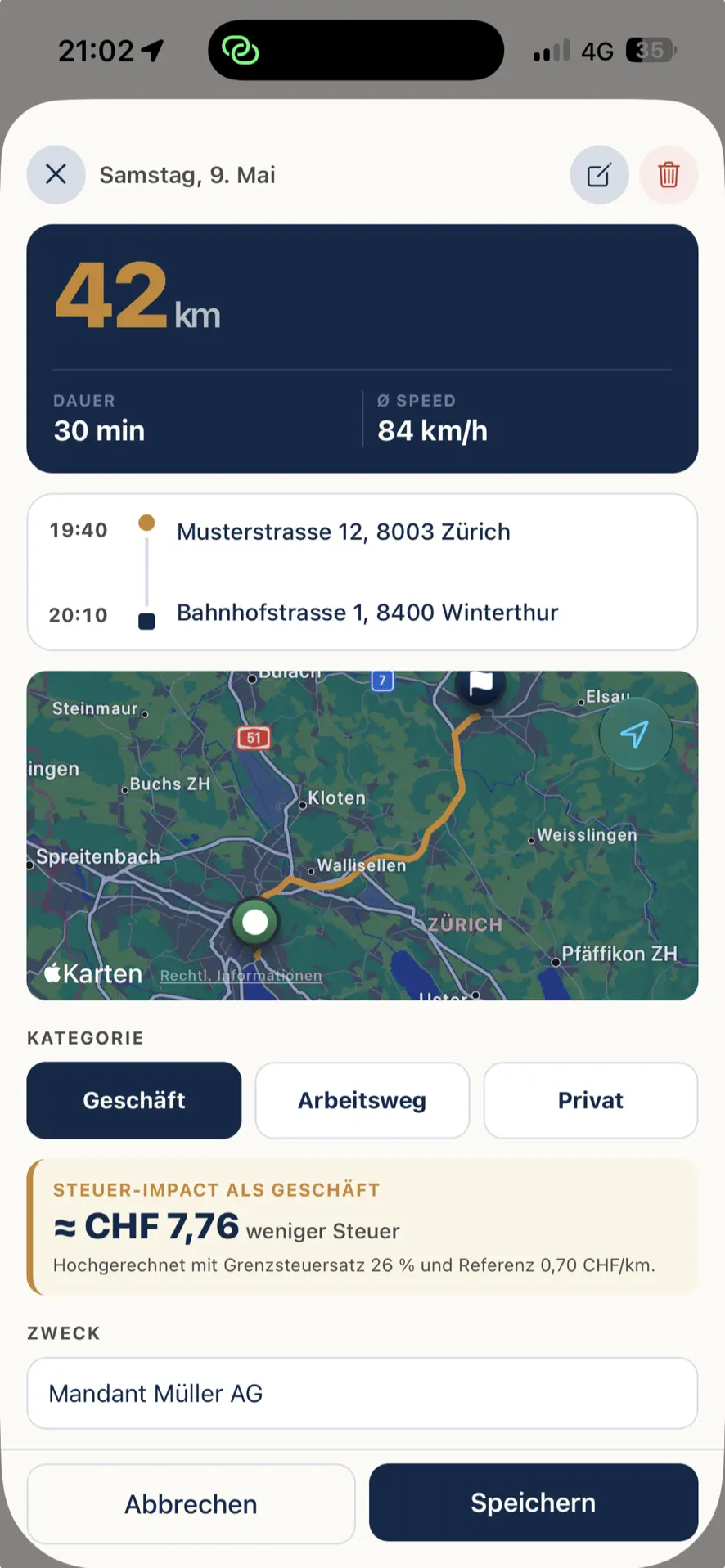
Every trip in detail
Route, duration, kilometres — and what the trip is worth for tax. One tap is enough for the category.
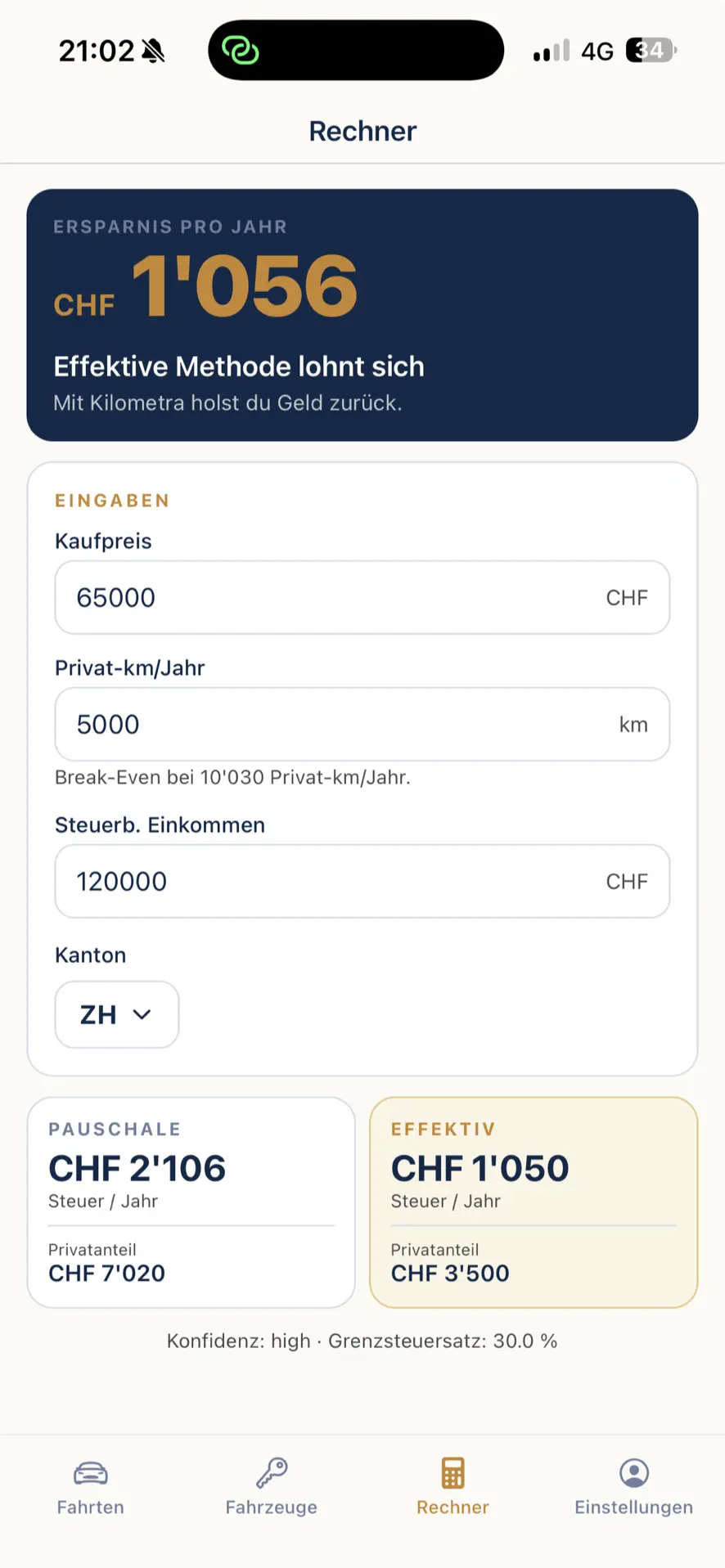
Flat rate or actual cost?
The calculator compares both methods with your numbers and shows the difference in francs.
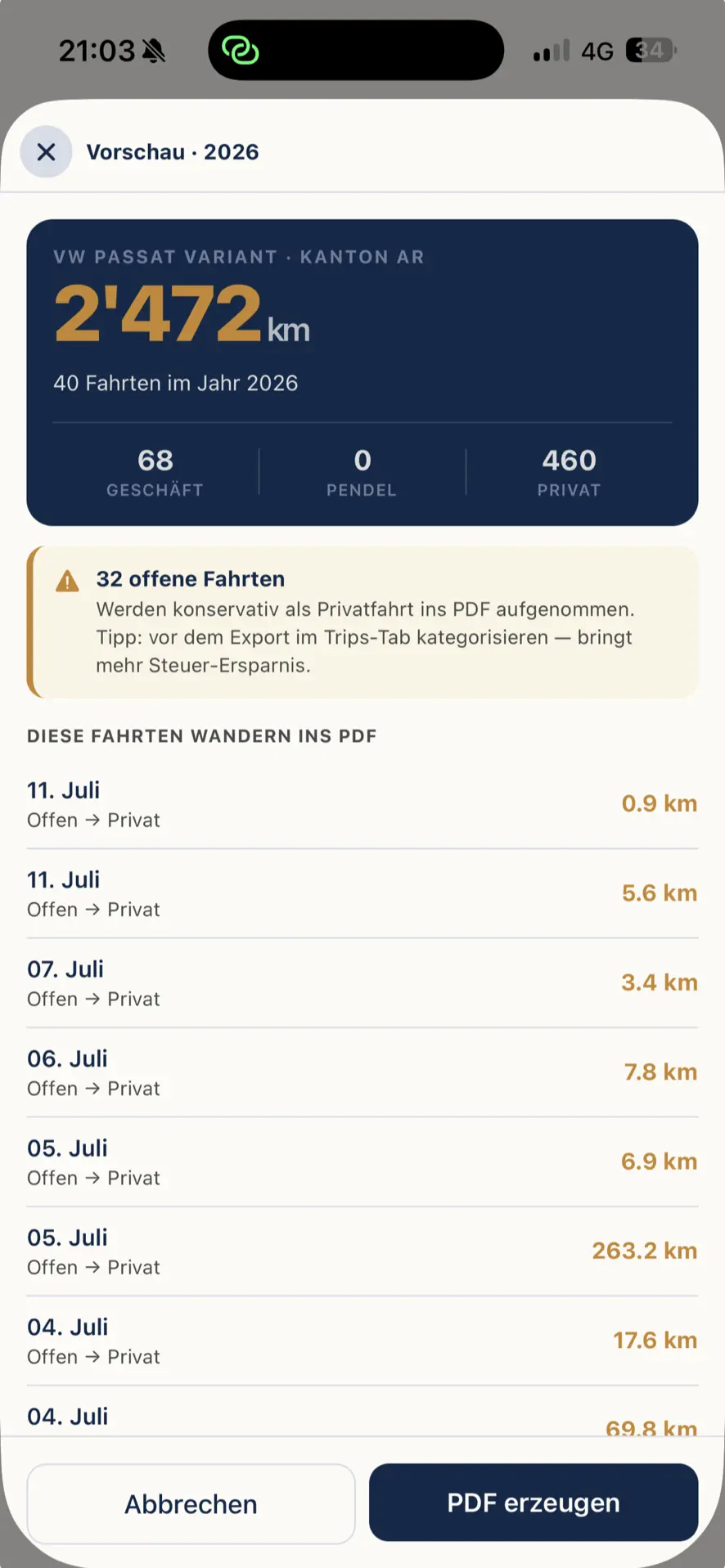
Preview before export
You see exactly which trips go into the PDF — including a note on trips that are still open.
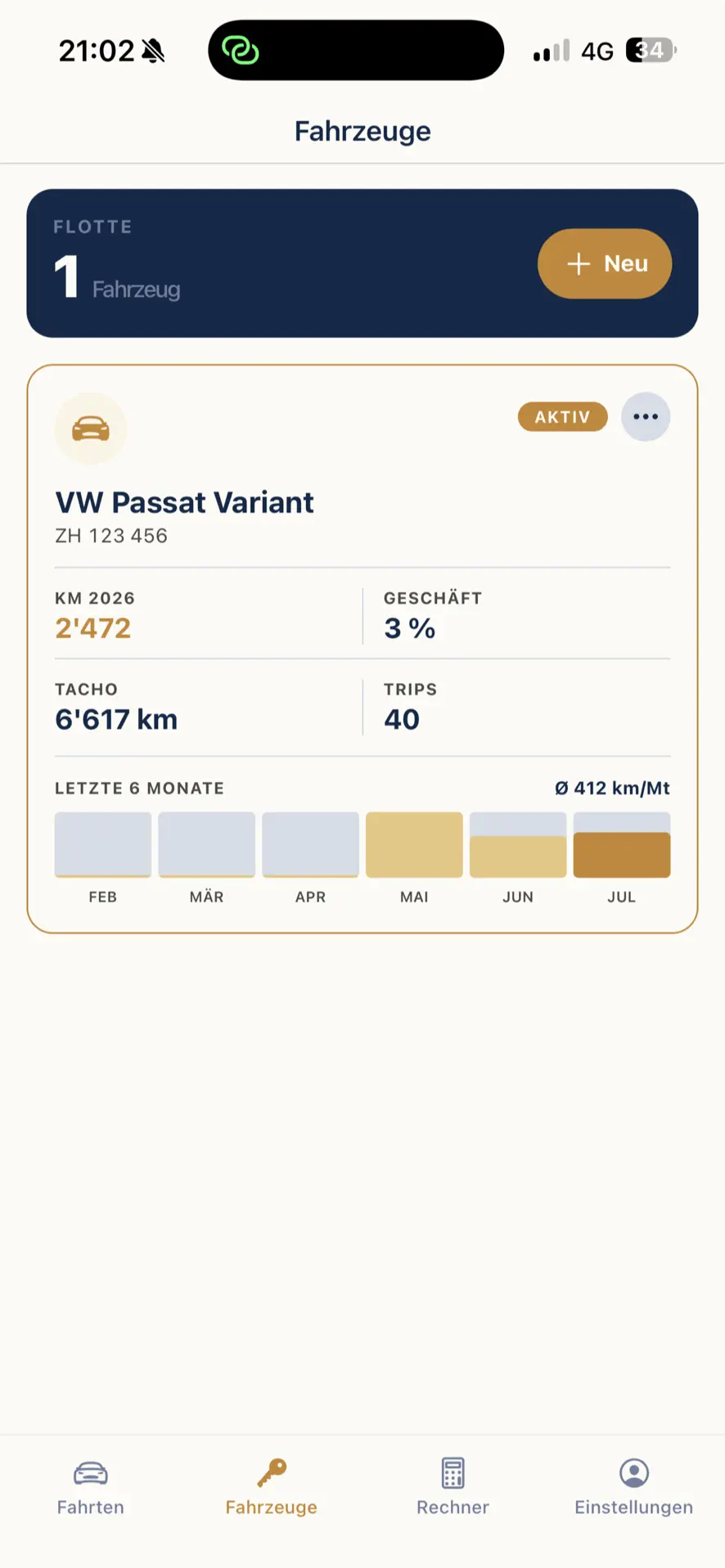
Your vehicles at a glance
Odometer reading, business share and monthly history per vehicle — even with several cars.
In your browser too
Your mileage log on the computer
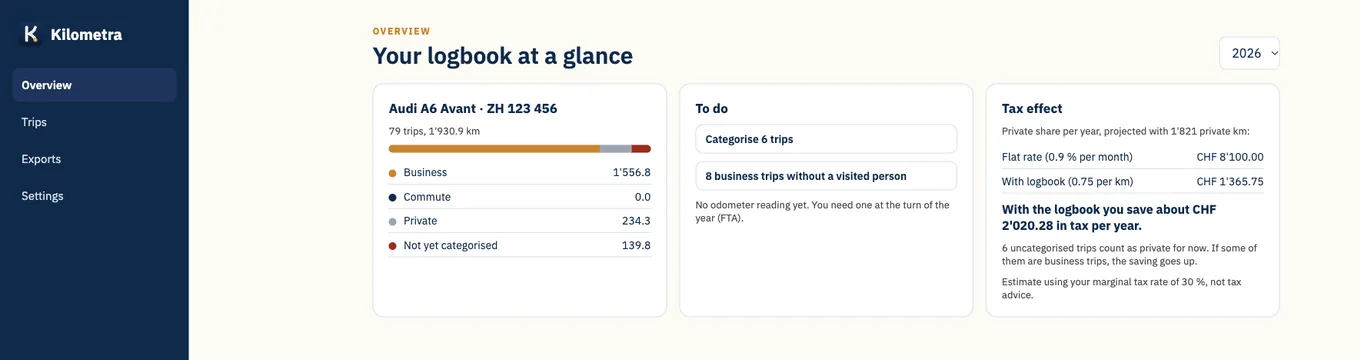
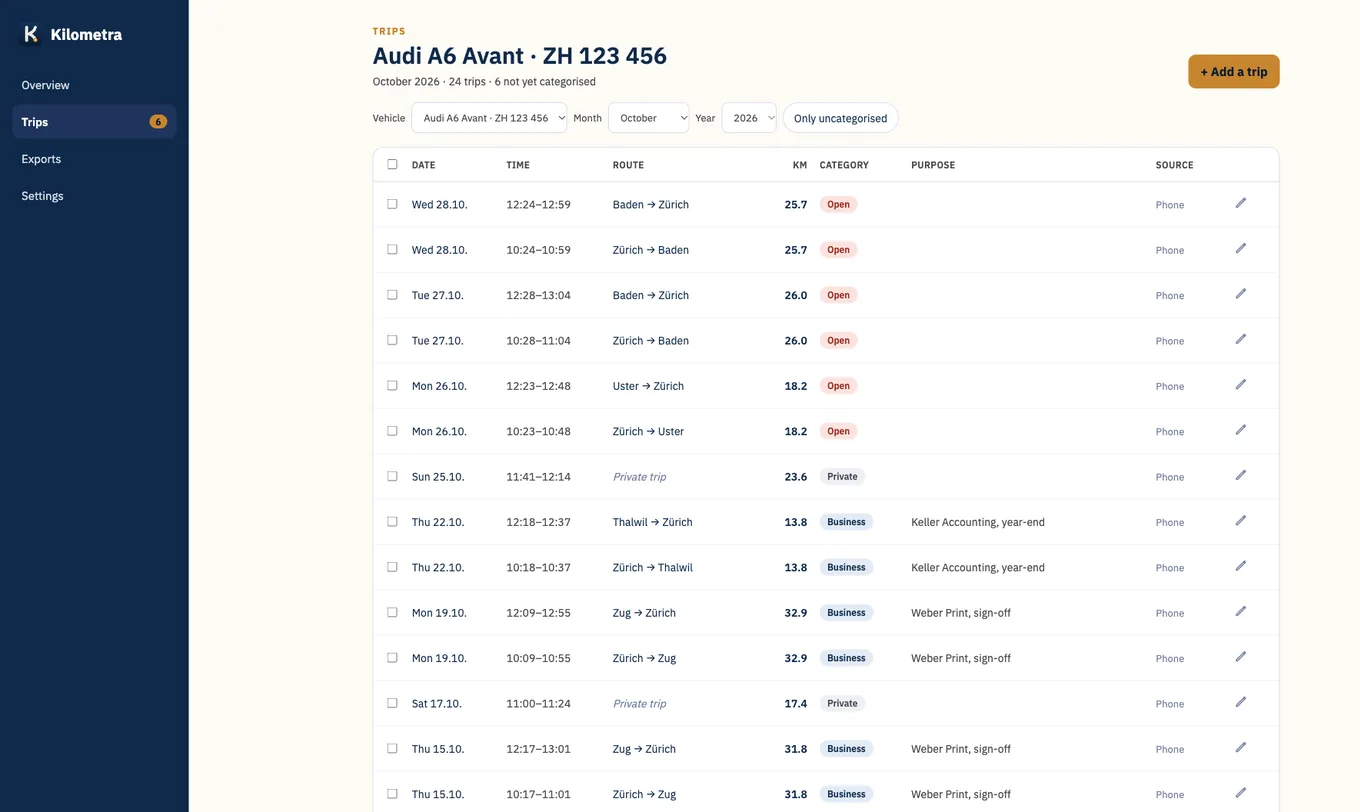
At app.kilometra.ch you see all your trips on the big screen, categorise them, add forgotten ones and download the tax PDF. Plus trips per customer to attach to your invoice and a CO2 report. With the same account as in the app.
Cost-benefit calculator
Is a mileage log worth it for you?
Enter your key figures. We calculate locally in your browser — no data leaves your computer.
Price
One app. One annual plan. More money in your account.
Annual plan
CHF 49/year
Save 41 % compared with the monthly plan.
One tax season is usually enough to earn it back several times over.
Both plans include the full mileage log without restrictions. Accounting (Bexio, Banana, Abacus) is an add-on. The app is billed through Apple in-app purchases. Your data stays available locally even after you cancel.
Coming soon
What we're working on
No dates, we don't promise anything that isn't finished yet. Got a wish? Write to me at gregor@kilometra.ch.
OBD plug
A small plug in the diagnostic port delivers the kilometres straight from the car. We're testing how reliably it works with different cars and will report openly on the results.
Accounting with Bexio, Banana and Abacus
Book the private share of your company car automatically every month and file receipts for fuel or charging directly as expenses. For companies on Abacus, also your employees' mileage expenses. Abacus starts as a pilot: get in touch and we set up the connection with you. KLARA is in preparation. As an add-on to Pro.
Car expenses
Attach receipts for parking, fuel or charging to the trip and export them together with the mileage allowance as a monthly report with receipt photos. For a private car, Kilometra only counts what is not already covered by the per-km rate.
Made for iPhone Duo
Unfolded, your trips on the left and the selected trip on the right, with a sidebar instead of the tab bar. Folded, everything stays as you know it.
Photograph the vehicle registration
Take a photo of the registration document and Kilometra fills in make, plate and first registration, and knows the car's CO2 value through the type approval.
For companies with several drivers
The company invites its drivers and sees business trips, private share and expenses per vehicle, with a monthly close for payroll. Private trips appear for the company only as a kilometre total, without locations.
Frequently asked questions
What you should know
Which cantons are supported?
All 26. For ZH, BE, AG, SG, ZG, GE, VD and BS, the address of the respective cantonal tax administration appears in the PDF letterhead, for the other cantons a general letterhead. The trip details are the same everywhere.
Are my private trips passed on to the tax office?
No. In the tax PDF, private trips only appear as a distance, without location and without purpose. The tax office has no right to know where you go privately.
How accurate is the automatic detection?
With the shortcut, to the second: the trip starts when your iPhone connects to the car via Bluetooth or CarPlay, and ends when it disconnects. Without the shortcut, Kilometra detects trips using the iPhone's sensors. That's convenient, but not perfect: during breaks, for example while charging or at a restaurant, a trip can split into parts, and the start is sometimes detected a little later. Every trip can be corrected with a tap, and every change is logged, as required by the Swiss Federal Tax Administration (ESTV).
Is an electronic mileage log accepted in Switzerland?
Yes, if it meets the requirements of the Swiss Federal Tax Administration: date and kilometres of every trip, destination and person visited for business trips, and later changes must be documented. Kilometra records every change to a trip in a change log.
Can Kilometra get the trips directly from the car?
We're testing this with the first vehicles. The odometer reading then comes straight from your car. What else a vehicle provides depends on the manufacturer and the model, and manufacturers keep changing their interfaces. That's why Kilometra records your trips via the iPhone. The connection to the car adds to this where it's available.
What happens if I cancel?
The trips you've recorded so far are kept, and you can still view them. For the PDF mileage log and automatic detection you need Pro. Without a subscription you can log up to 15 trips per month by hand. Only if you don't sign in for 24 months do we delete your account, after two email warnings.
Can I have my accountant manage Kilometra?
Yes. In the web view at app.kilometra.ch you invite your accountant by email. Once they accept, they see your trips, the tax PDF and a CSV export, read-only and without a subscription of their own. You can revoke access at any time.
Where is the data stored?
On your iPhone and, if you've created an account, encrypted on servers in the EU (Frankfurt, Germany). For the vehicle connection, currently in testing, the vehicle data also passes through a server in Switzerland. Your trips do not go to the USA, no third-party tracking, no advertising analytics.